Documentation
Design
Design principles, system choices, and what is shipped vs planned.
Design
Conduit is designed as an answer engine for AI tools: it pulls the smallest slice of your private context that actually answers the question - so you get leverage without context bloat.
This page explains the design choices behind that promise: what Conduit optimizes for, how the system is structured, what is shipped vs planned, and why specific technologies were chosen.
What Conduit is optimizing for
Conduit is built to solve two hard problems at the same time:
- Private context without oversharing. You should be able to use your own docs without dumping them into a cloud prompt or a brittle one-off pipeline.
- No context bloat. The system should return exactly what the AI tool asked for, not a swamp of irrelevant text.
The central design principle is simple: Conduit is an answer engine for AI tools. It does not try to be an LLM, a chat UI, or a generic data lake. It gives you just enough evidence to answer the question, with traceability.
Local-first matters because it keeps sensitive knowledge in your control by default, reduces setup risk, and keeps latency predictable for daily workflows.
System overview
At a high level, Conduit is a CLI-first system that orchestrates a local knowledge base and exposes it through an MCP server. A background daemon owns state and lifecycle, while the CLI provides the operator surface. Optional subsystems (KAG and the desktop GUI) sit on top without changing the core contract.
Major subsystems:
- CLI (user surface): The primary interface for setup, ingestion, search, and diagnostics.
- Daemon (orchestrator): Long-running local service that owns state and coordinates work.
- KB engine: Ingestion, chunking, hybrid retrieval (FTS5 + Qdrant), and result shaping.
- Optional KAG pipeline: Entity extraction, graph build, and multi-hop queries via FalkorDB.
- MCP server: Read-only tool interface for AI clients.
- Storage layers: Local metadata store, vector DB, and optional graph DB.
- GUI companion (V1): Experimental desktop UI that calls the CLI and daemon.
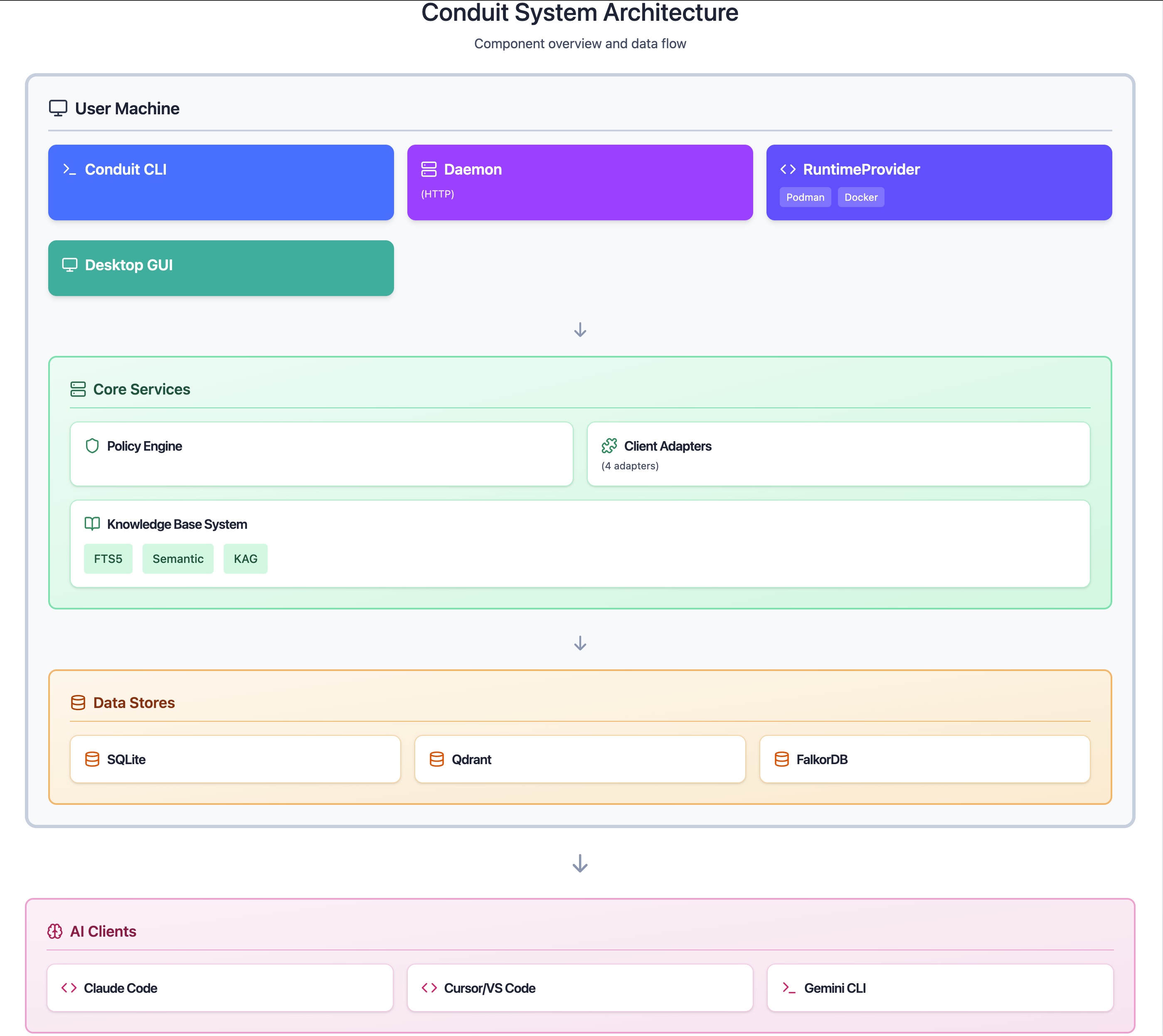
Conduit System Architecture
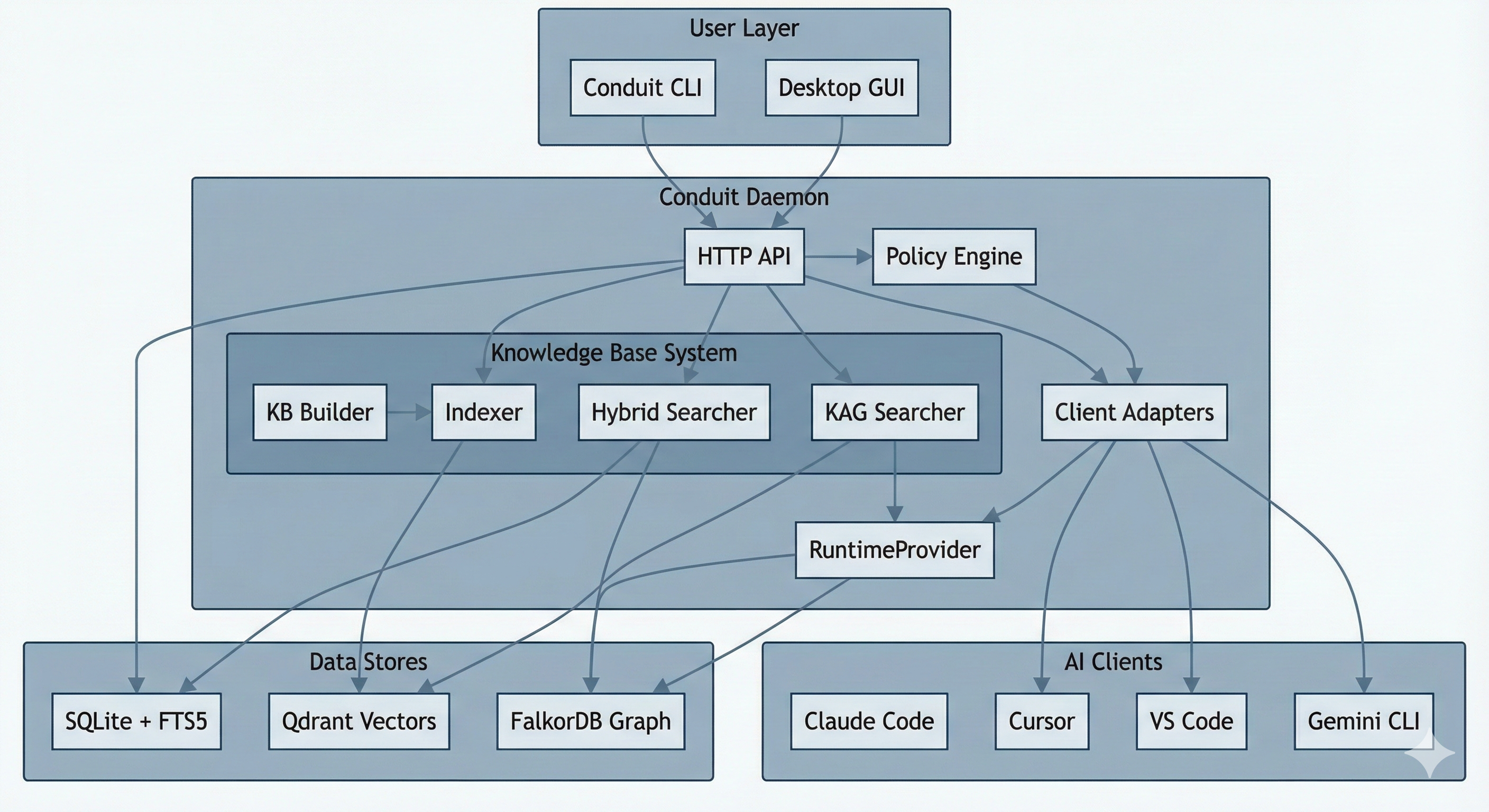
High Level Architecture
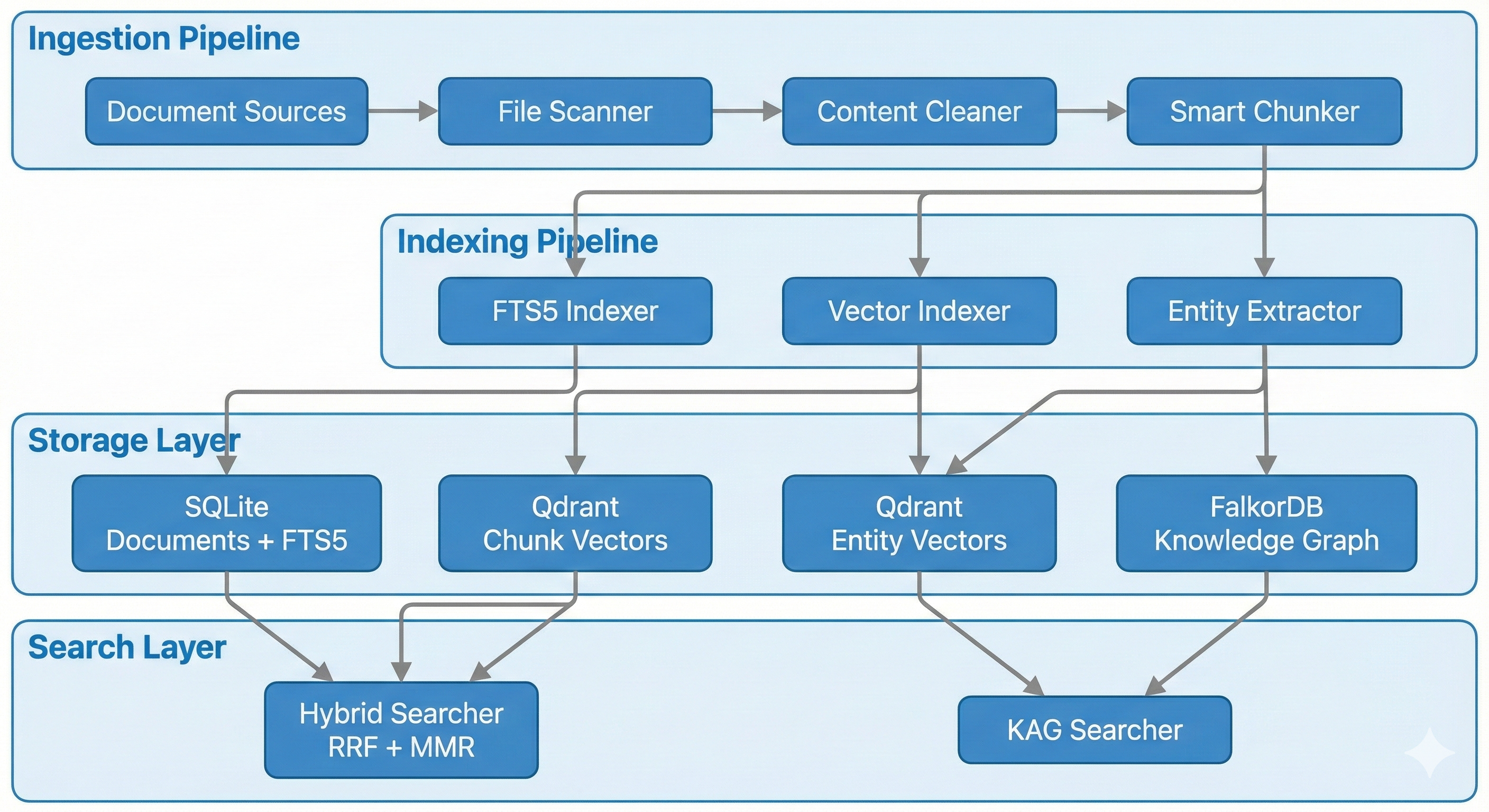
High Level Architecture
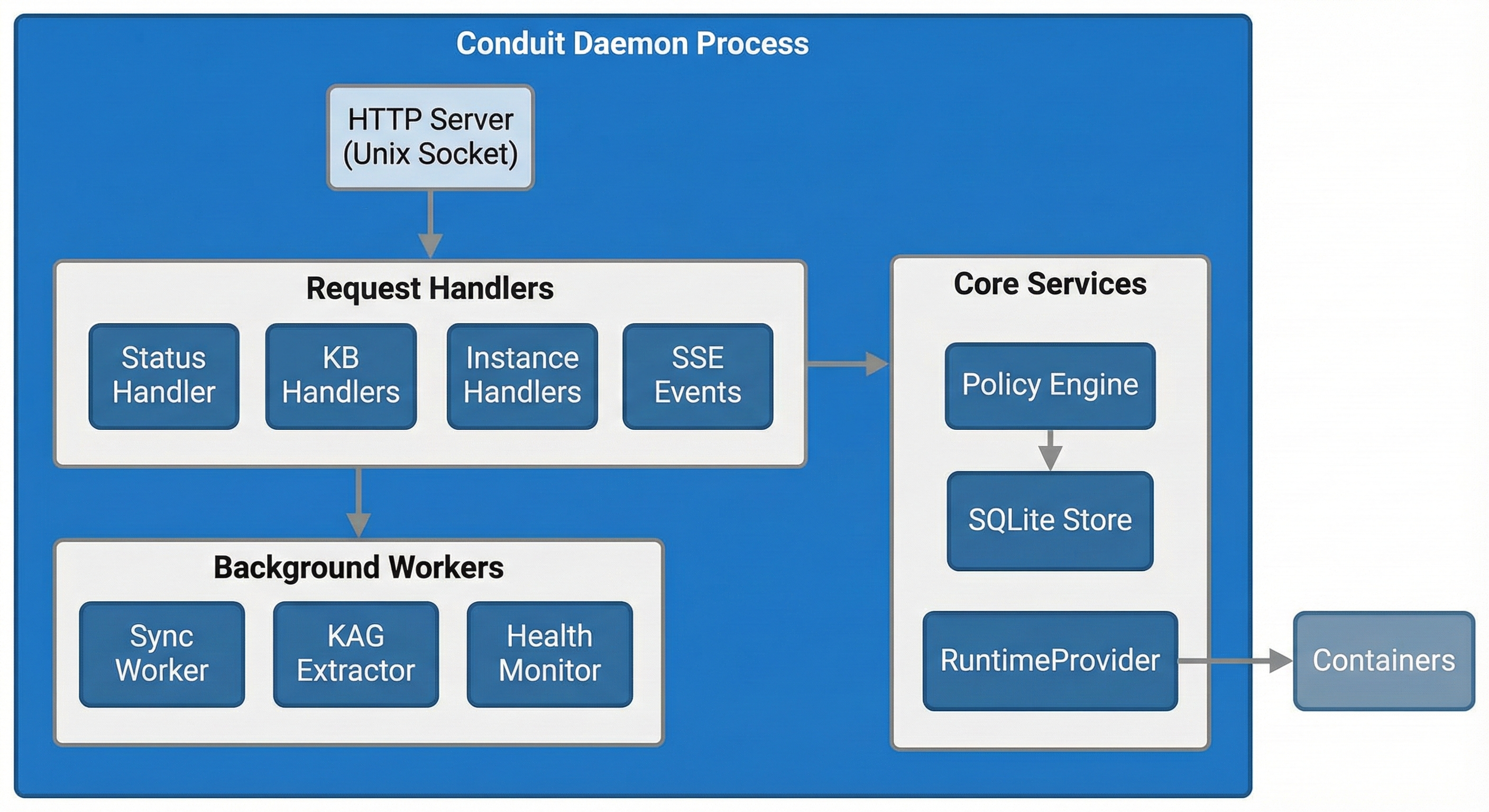
Daemon Architecture
Data model and storage choices
Conduit stores data locally because the system is designed to be private by default and offline-capable.
Key data locations and why they exist:
~/.conduit/conduit.db: SQLite metadata store for sources, chunks, and KB state.~/.conduit/conduit.yaml: Primary config file, including MCP settings.~/.conduit/conduit.sock: Local Unix socket used by the CLI to call the daemon.~/.conduit/logs/conduit.log: Daemon log output for diagnostics.CONDUIT_HOME: Environment variable that overrides the data directory.
Storage backends:
- Qdrant (vector DB): Stores embeddings and metadata for semantic search.
- FalkorDB (graph DB): Stores entities and relationships when KAG is enabled.
These choices are pragmatic: SQLite for local metadata and durability; Qdrant for fast vector similarity; FalkorDB for multi-hop graph traversal when structure matters.
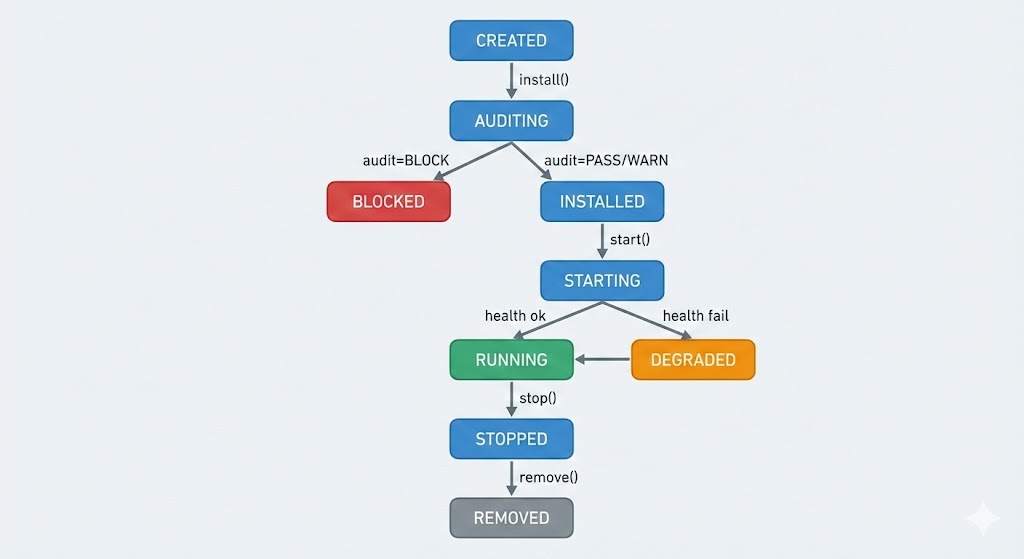
State Machine
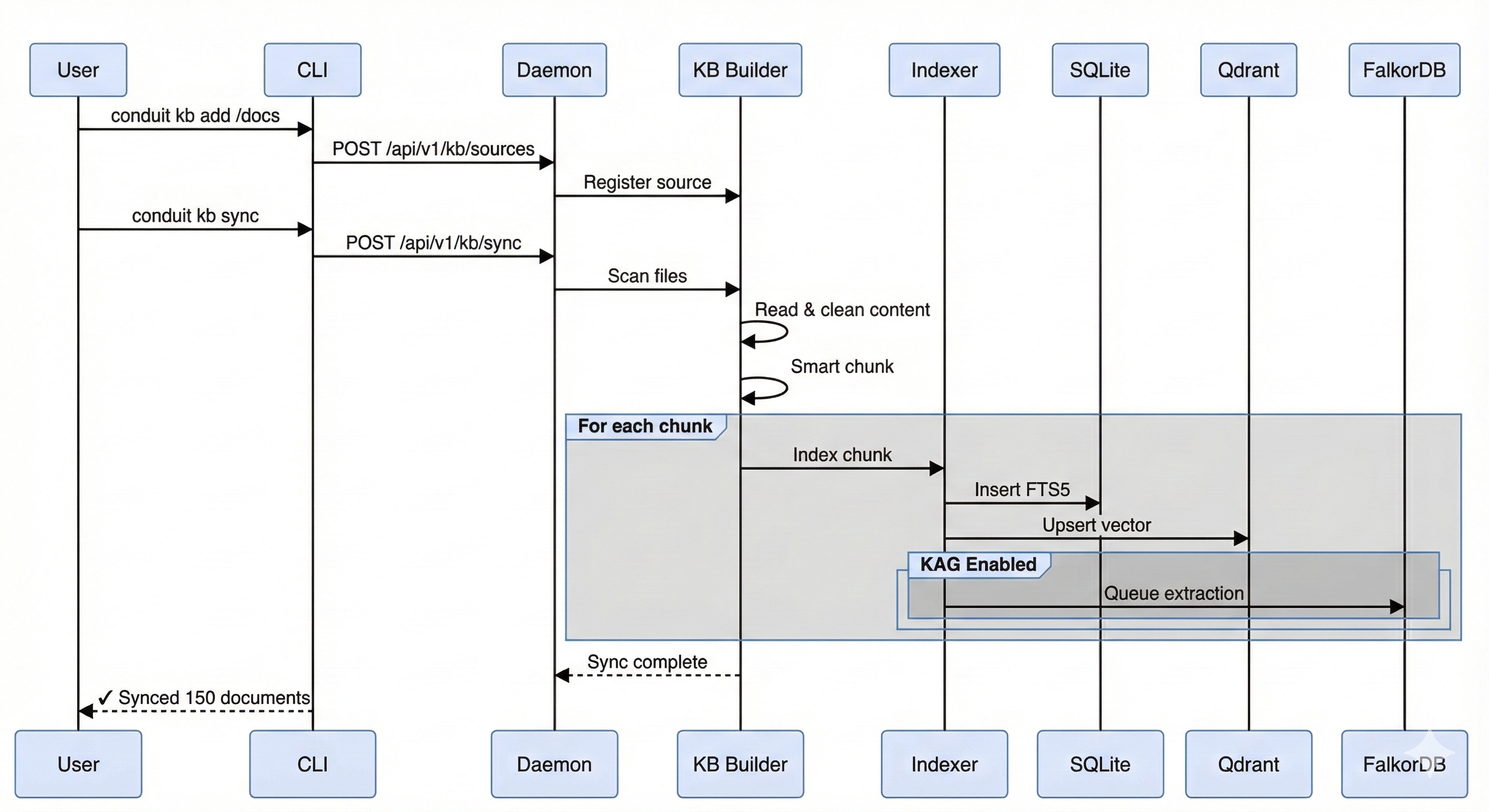
Document Ingestion Process
RAG pipeline design
RAG is the default. It is optimized for retrieval quality and minimal context output.
Pipeline stages:
- Ingestion: Add sources, extract content, normalize, and chunk.
- Embedding: Generate vectors (local models via Ollama) and store in Qdrant.
- Hybrid retrieval: Run FTS5 and vector search in parallel, fuse with RRF, apply MMR diversity, and rerank.
- Response shaping: Return a small number of high-signal chunks with citations.
Conduit avoids context bloat by using query-adaptive weighting and limiting output to what the AI tool needs. It also degrades gracefully: when Qdrant or Ollama is unavailable, it falls back to FTS5 rather than failing hard.
Performance considerations (from the current implementation):
- FTS5 is fast (single-digit to tens of milliseconds).
- Semantic search adds latency (tens to hundreds of milliseconds).
- Cold starts can spike to 10+ seconds while models warm up.
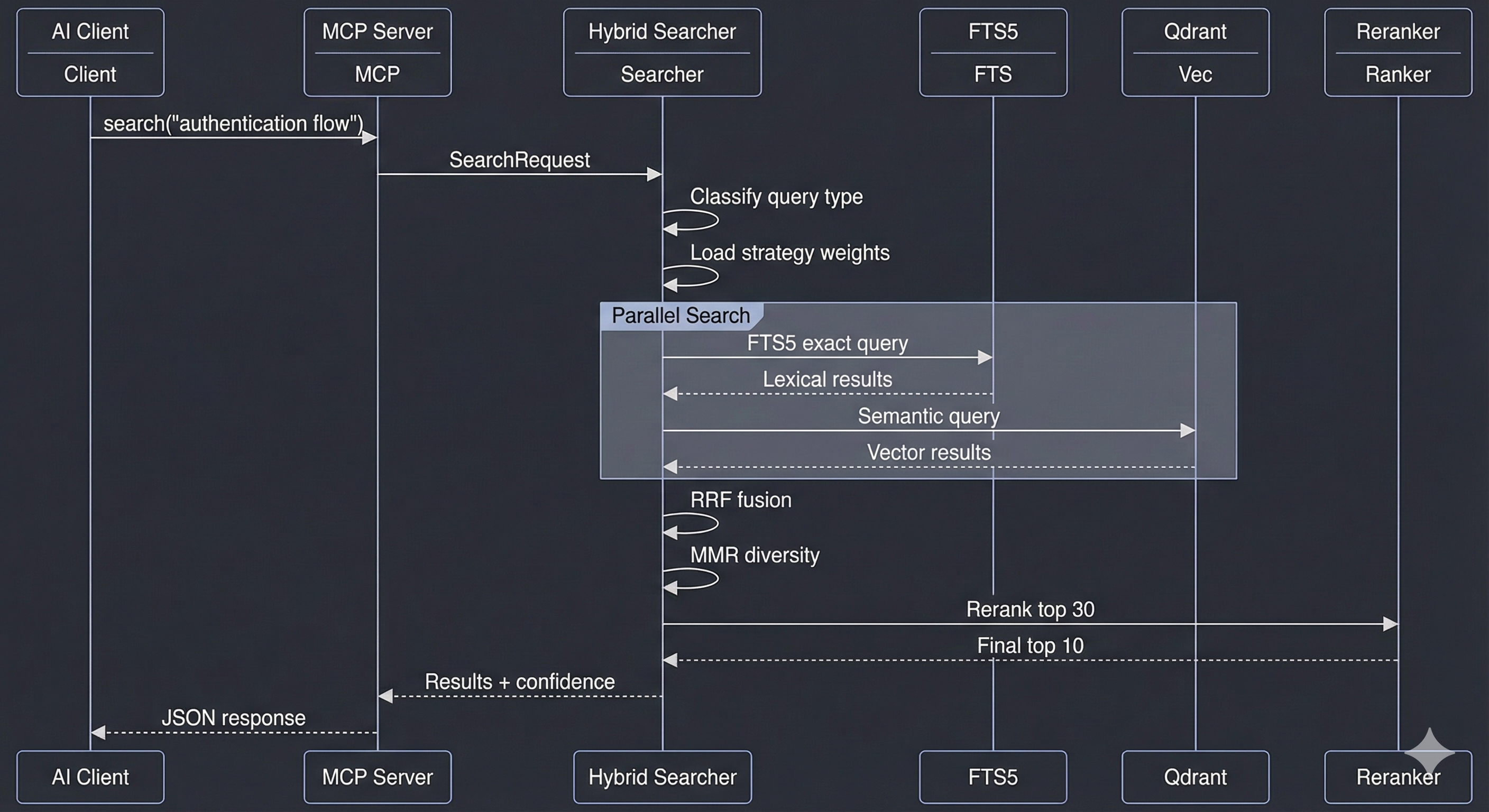
KB Search Process
For operational details and tuning, see /docs/mcp and /docs/admin.
KAG pipeline design (optional, slower, more expensive)
KAG adds a knowledge graph on top of the same sources. It is powerful, but expensive in build time and storage, so it is intentionally optional.
How it works:
conduit kb kag-syncextracts entities and relationships after your KB is synced.- Entities and edges are written into FalkorDB; SQLite tables provide a base layer.
conduit kb kag-queryruns multi-hop graph queries and returns structured evidence.
Trade-off: KAG builds are significantly slower than vector indexing and use more CPU, memory, and storage.
When KAG is worth it:
- Stable ontology and entity-centric domains (drugs-conditions-contraindications, services-dependencies, contracts-clauses).
- Multi-hop, constraint-heavy queries where path structure matters.
- Auditability and explainability requirements.
- Workloads where graph costs can be amortized across many queries or products.
Most users should stay in RAG-only mode unless they explicitly need structured, multi-hop reasoning. For hands-on usage, see /docs/kag.
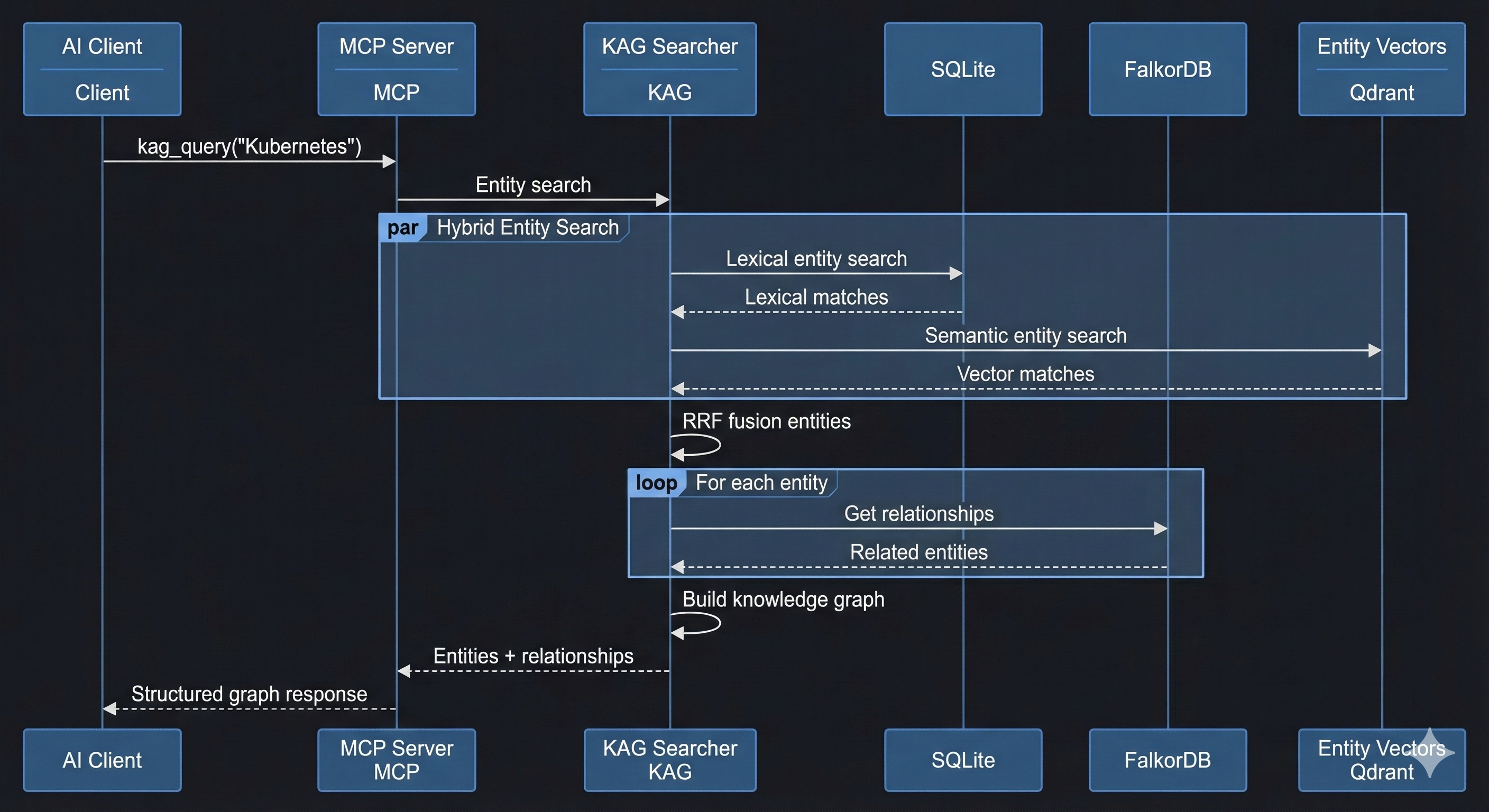
KAG Query Process
MCP server architecture
Conduit exposes the KB through a read-only MCP server. This keeps the surface area small and safe while still letting AI tools request evidence on demand.
Key points:
- The MCP server runs via
conduit mcp kband communicates over JSON-RPC on stdio. - Configuration lives in
~/.conduit/conduit.yamlwith defaults underCONDUIT_HOME. - The tool surface is intentionally read-only: add/remove/sync operations stay in the CLI.
- Results are minimal by design: a small set of chunks plus citations.
If you need configuration details or client wiring, see /docs/mcp.
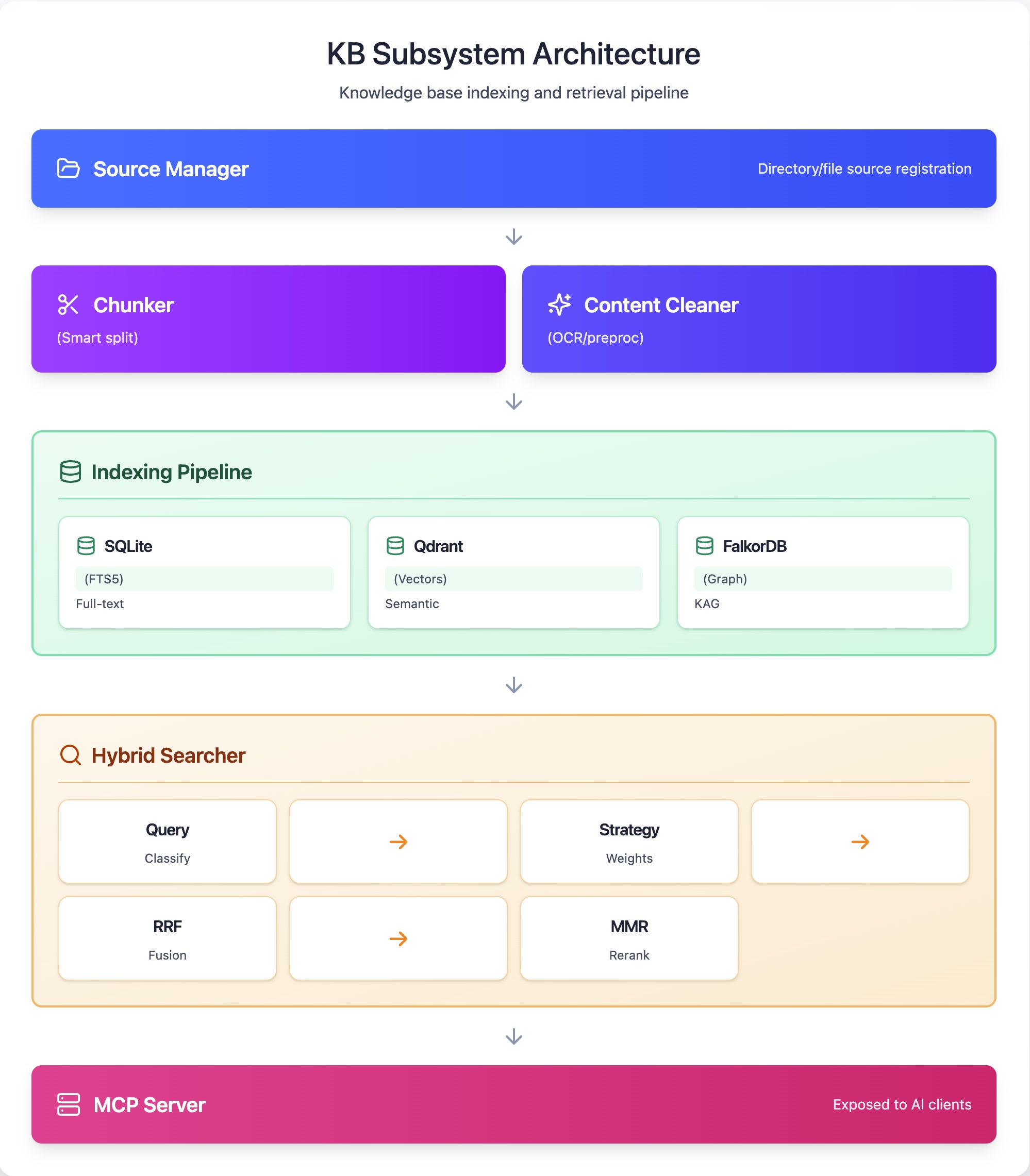
KB Subsystem Architecture
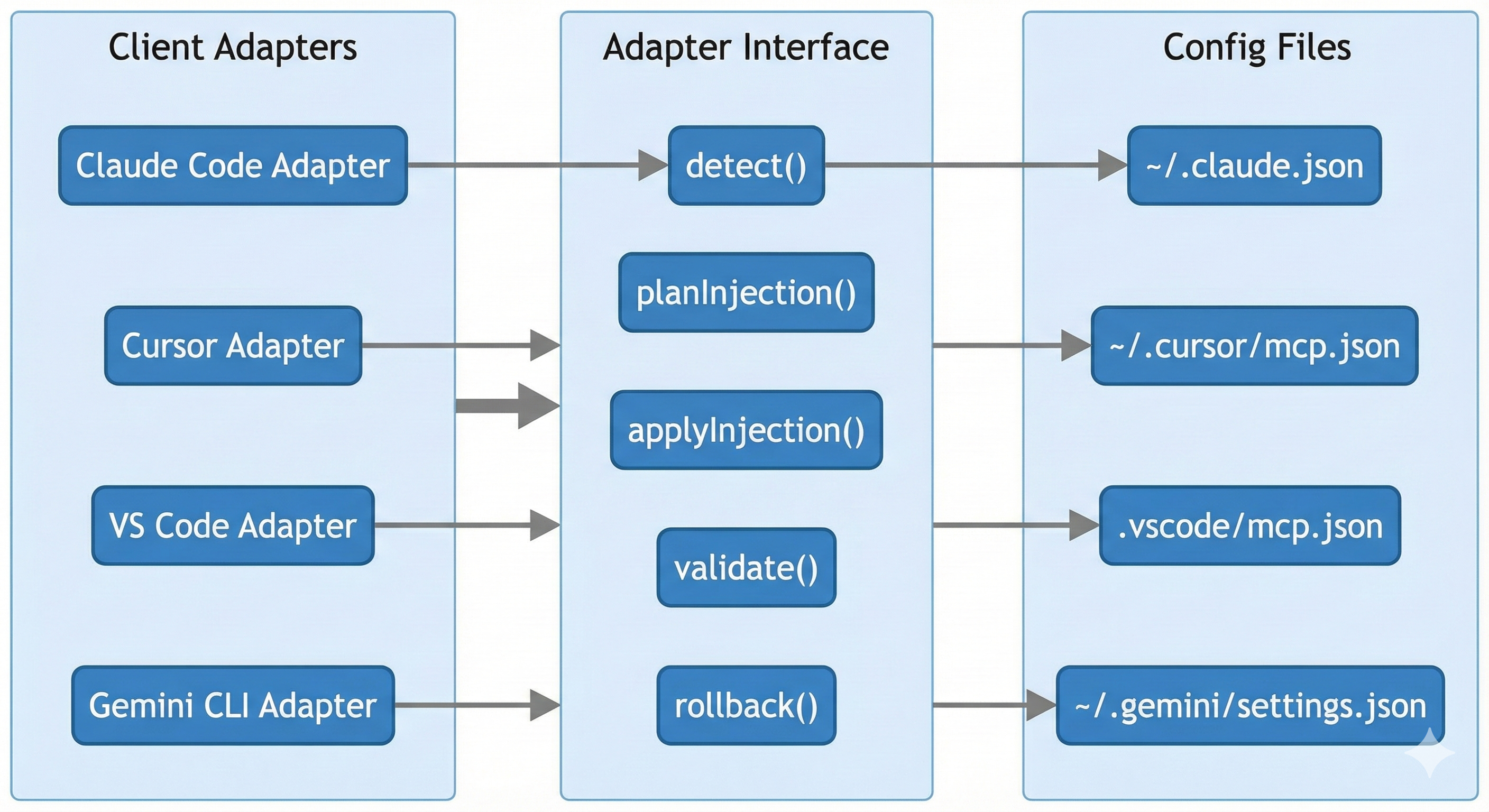
Client Adapter Architecture
Desktop GUI architecture (V1)
The GUI is a companion app, not a replacement. It wraps the CLI and daemon to provide a visual workflow for common tasks.
Design intent:
- CLI-first: the CLI remains the source of truth.
- GUI as client: the GUI invokes CLI commands and reads daemon state.
- Experimental scope: macOS-only today, incomplete feature coverage, and likely to have sharp edges.
For user-facing guidance, see /docs/gui.
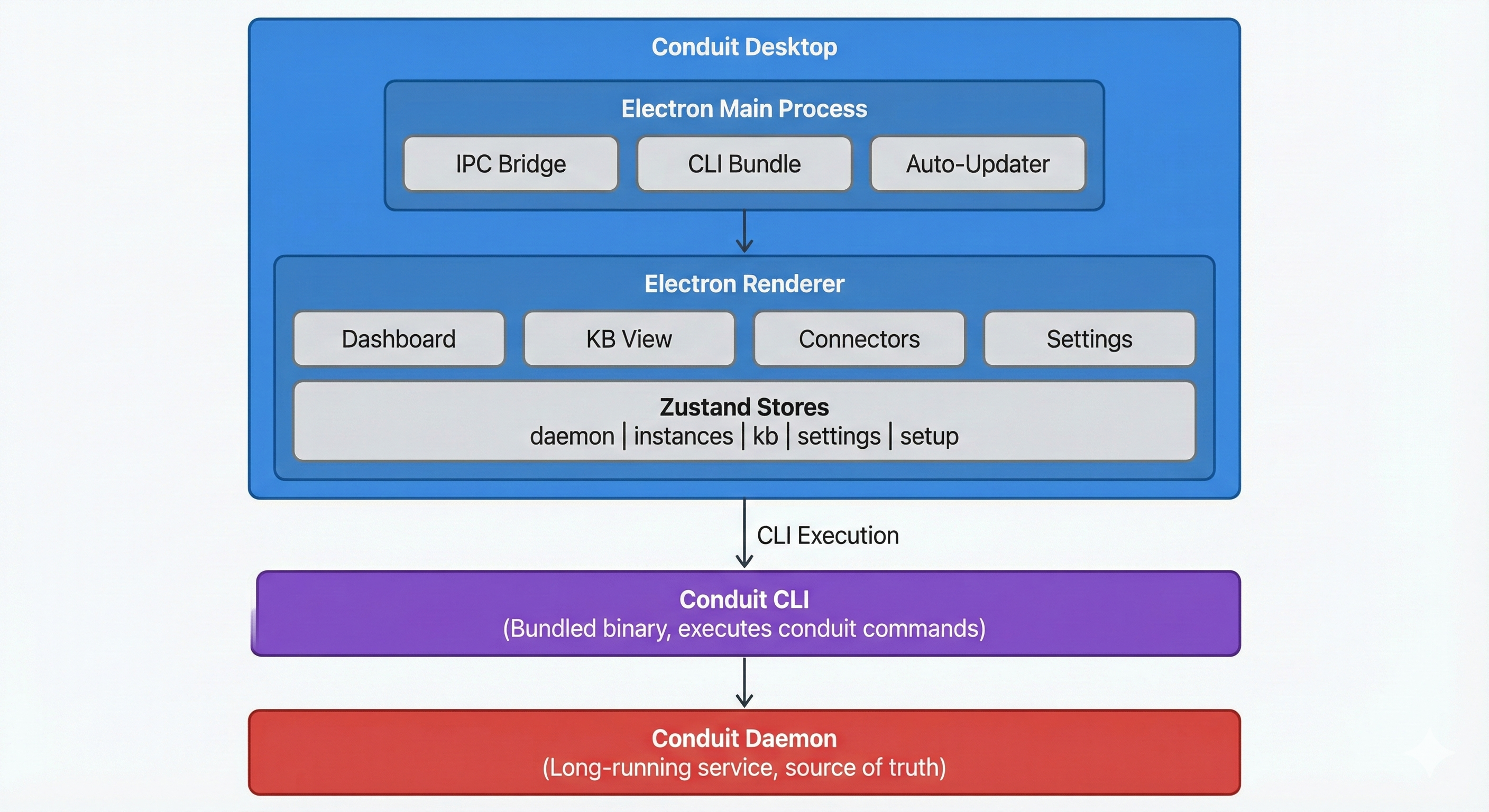
Desktop GUI Architecture
Secure Link (V0.5) - design for remote-only clients
Some AI clients require a public HTTPS endpoint. Secure Link is the design to support those clients without exposing your local machine directly.
The design (not implemented yet):
- A gateway/tunnel (Cloudflare or ngrok) exposes a controlled
/mcpendpoint. - Token-based auth and logging are required for every request.
- Permissions are explicit and revocable, with a bias toward least privilege.
This is deferred in favor of the local-first experience. See the V0.5 HLD for details.
What's implemented vs planned
| Subsystem | Status | Notes |
|---|---|---|
| CLI + daemon core | Shipped | Primary user and orchestration surface |
| KB builder + hybrid search | Shipped | FTS5 + Qdrant + RRF + MMR + rerank |
| MCP KB server | Shipped | Read-only tools over stdio |
| KAG pipeline + FalkorDB | Shipped | Optional, heavier workflow |
| Desktop GUI | Experimental | Electron app, partial coverage |
| Auto-updater | Experimental | Partial implementation |
| Consent ledger | Planned | Schema only today |
| Secure Link + gateway | Planned | HLD exists, not implemented |
| Connector marketplace | Planned | Deferred to V2 |
Implementation reference: https://github.com/amlandas/Conduit-AI-Intelligence-Hub/blob/main/docs/HLD/IMPLEMENTATION_STATUS.md
Design FAQ
Why local-first?
Because private context is the differentiator. Local-first keeps data in your control and reduces setup risk.
Why Qdrant + FalkorDB?
Qdrant delivers fast semantic search; FalkorDB supports multi-hop graph traversal when structure matters.
Do I need Docker?
Conduit prefers Podman for a more secure default, but Docker is supported. See /docs/install.
When should I choose KAG?
Only when you need structured, multi-hop, auditable reasoning. Most users should start with RAG-only.
How does Conduit avoid context bloat?
By using query-adaptive retrieval, hybrid search fusion, and strict limits on what gets returned.