Documentation
Architecture Overview
How Conduit is structured: services, data paths, and trust boundaries.
Architecture Overview
Executive summary
- Conduit today is a CLI-first, local private knowledge base with an MCP server that exposes read-only retrieval tools to AI clients.
- It is not yet the full MCP connectivity hub or connector marketplace; those are part of the roadmap.
- Conduit avoids context bloat by returning only the evidence requested by the AI tool, with citations.
- Use RAG for fast, broad retrieval and KAG when you need structured, multi-hop, auditable reasoning.
- Your data stays local by default; vector and graph stores run on your machine.
- Learn next: Install, Quickstart, CLI, MCP, KAG, Troubleshooting, GUI.
Architecture at a glance
Conduit is an answer engine for your AI tools. You add sources, Conduit builds indexes, and AI clients query Conduit over MCP to retrieve the smallest, most relevant evidence needed to answer.
Key components:
- CLI: The primary interface that orchestrates setup, sources, sync, and diagnostics.
- Knowledge base ingestion and indexing: Extracts, cleans, chunks, and indexes documents for fast retrieval.
- Vector store (Qdrant): Stores embeddings for semantic search and hybrid ranking.
- Knowledge graph store (FalkorDB) for KAG: Optional graph layer for entity and relationship traversal.
- MCP server layer: Read-only tool interface used by AI clients to request evidence with citations.
- Optional GUI companion on macOS (experimental): A visual cockpit that calls the CLI, not a replacement. See /docs/gui.
Data flow (RAG)
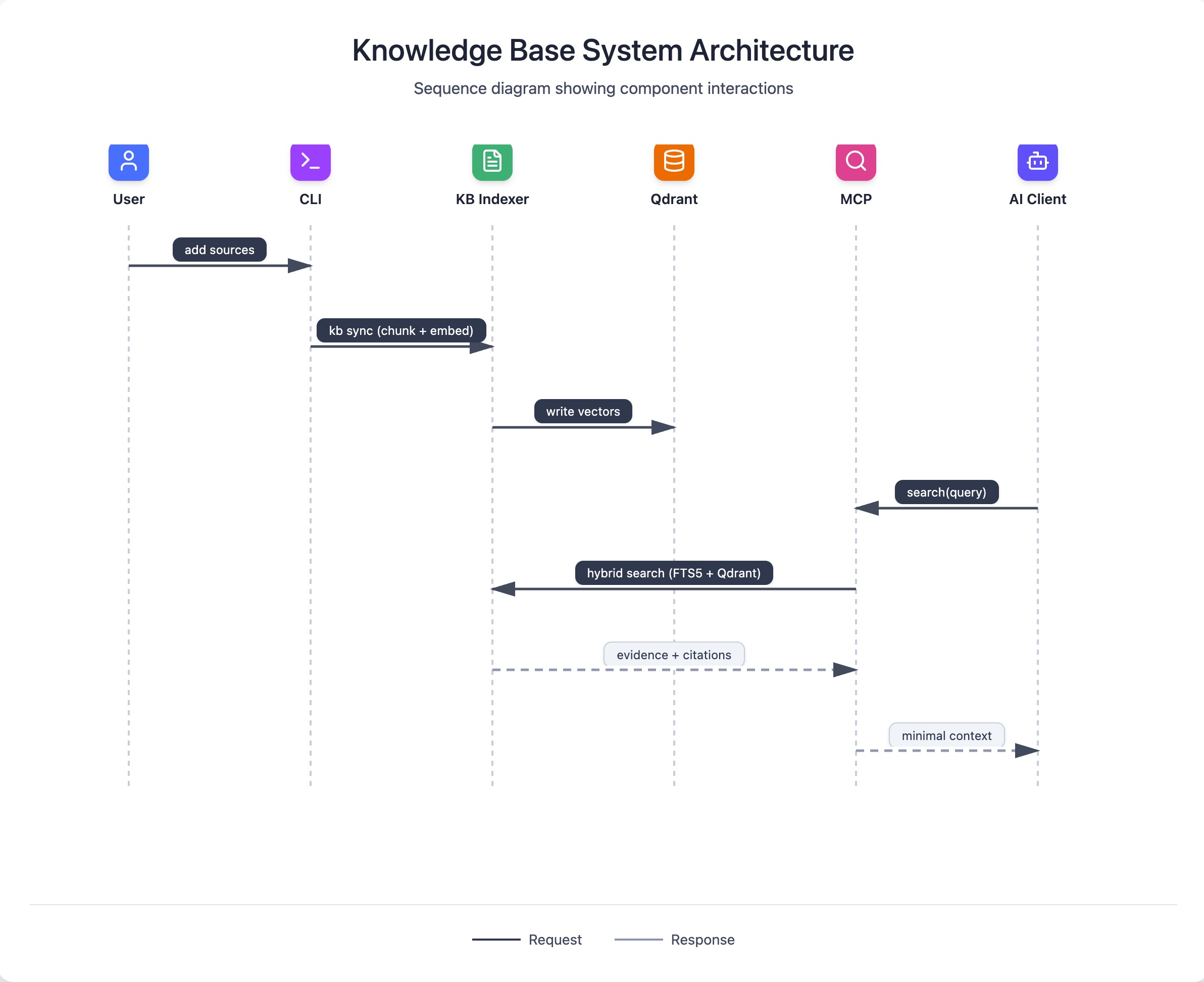
RAG is the default pipeline for most users. Conduit builds a hybrid search index (SQLite FTS5 plus semantic vectors in Qdrant) and answers retrieval requests from AI clients via MCP.
- Add sources to your KB with the CLI.
conduit kb syncchunks content and builds embeddings.- AI tools call MCP search tools with a focused query.
- Conduit runs hybrid retrieval (lexical + semantic, fused with query-adaptive weighting).
- Conduit returns top snippets and citations; the AI client writes the final answer.
sequenceDiagram
participant User
participant CLI
participant KB as KB Indexer
participant Qdrant
participant MCP
participant Client as AI Client
User->>CLI: add sources
CLI->>KB: kb sync (chunk + embed)
KB->>Qdrant: write vectors
Client->>MCP: search(query)
MCP->>KB: hybrid search (FTS5 + Qdrant)
KB-->>MCP: evidence + citations
MCP-->>Client: minimal context
Data flow (KAG)
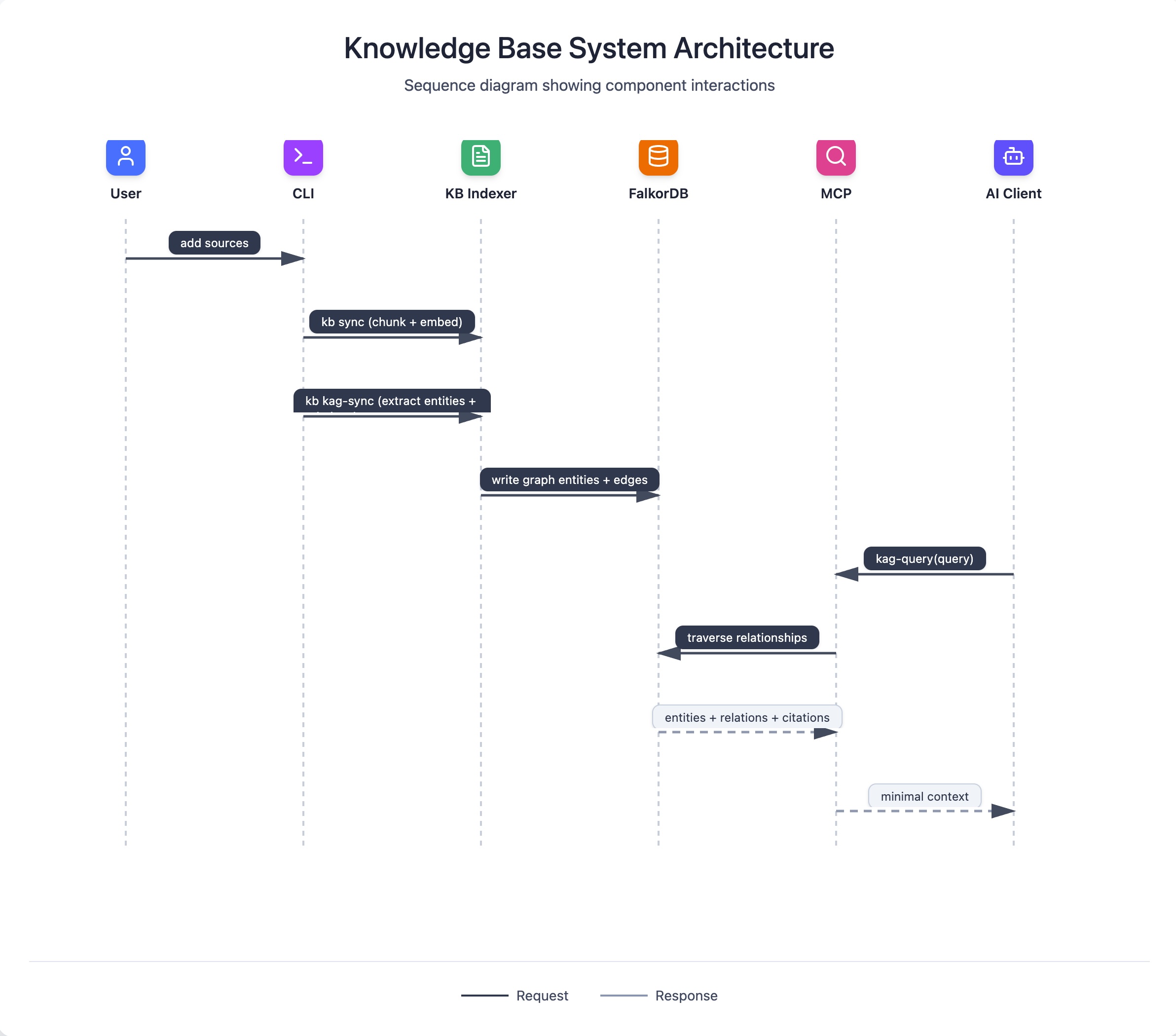
KAG extends the RAG pipeline with entity extraction and relationship modeling. It is slower and heavier, but it unlocks structured, multi-hop reasoning that plain retrieval cannot provide. KAG runs alongside RAG rather than replacing it.
At a high level:
- Conduit extracts entities and relations from indexed content.
- It stores graph data in FalkorDB for traversal (with local entity tables as a base layer).
- Queries can traverse relationships and return structured evidence and citations.
sequenceDiagram
participant User
participant CLI
participant KB as KB Indexer
participant Graph as FalkorDB
participant MCP
participant Client as AI Client
User->>CLI: add sources
CLI->>KB: kb sync (chunk + embed)
CLI->>KB: kb kag-sync (extract entities + relations)
KB->>Graph: write graph entities + edges
Client->>MCP: kag-query(query)
MCP->>Graph: traverse relationships
Graph-->>MCP: entities + relations + citations
MCP-->>Client: minimal context
When KAG is worth it:
- Your domain has stable entities and relationships.
- You need multi-hop, constraint-heavy queries with explainable paths.
- You plan to reuse the graph across many workflows.
See /docs/kag for workflow details.
Why Conduit is built this way (design principles in action)
- Because local-first privacy matters more than cloud features for private docs.
- Because evidence-first retrieval reduces hallucination surface and keeps answers auditable.
- Because a dedicated answer engine standardizes results across AI clients and avoids context bloat.
- Because progressive power matters: start with simple flows, then opt into KAG and advanced modes.
- Because RAG and KAG solve different problems and should run in parallel.
- Because containerized dependencies (Podman or Docker) keep the runtime predictable across machines.
Deeper references:
- DESIGN: https://github.com/amlandas/Conduit-AI-Intelligence-Hub/blob/main/docs/HLD/DESIGN.md
- HLD V0 Core Engine: https://github.com/amlandas/Conduit-AI-Intelligence-Hub/blob/main/docs/HLD/HLD-V0-Core-Engine.md
- KB Search HLD: https://github.com/amlandas/Conduit-AI-Intelligence-Hub/blob/main/docs/KB_SEARCH_HLD.md
- KAG HLD: https://github.com/amlandas/Conduit-AI-Intelligence-Hub/blob/main/docs/KAG_HLD.md
- Query Adaptive Design: https://github.com/amlandas/Conduit-AI-Intelligence-Hub/blob/main/docs/QUERY_ADAPTIVE_DESIGN.md
- MCP Server Design: https://github.com/amlandas/Conduit-AI-Intelligence-Hub/blob/main/docs/MCP_SERVER_DESIGN.md
Trust boundaries and safety model
- All indexed sources and databases stay on your machine by default.
- AI clients only receive the snippets and citations they ask for via MCP; Conduit is not an LLM.
- The MCP server is intentionally read-only: writes and destructive actions stay in the CLI.
- Qdrant and FalkorDB run as local services under your container runtime (Podman preferred, Docker supported).
- The original vision includes a sandboxed connector hub and secure link for remote clients, but that is roadmap work. See https://github.com/amlandas/Conduit-AI-Intelligence-Hub/blob/main/docs/Vision%20and%20PRD/ORIGINAL_VISION.md.
Performance and scaling notes
- Indexing time scales with corpus size, file types, and chunking choices.
- Hybrid search is fast once warm, but semantic retrieval depends on local embedding models.
- KAG builds are significantly heavier than vector indexing; plan for longer runs and more storage.
- Start with a small, known dataset, validate results, then scale.
Performance reference: https://github.com/amlandas/Conduit-AI-Intelligence-Hub/blob/main/docs/PERFORMANCE_ANALYSIS.md
Roadmap (honest and legible)
- Now: CLI-first KB, hybrid RAG search, MCP server integration, optional KAG workflows.
- Next: ergonomics, observability, safer defaults, and GUI stabilization.
- Later: the MCP connectivity hub vision, including connector discovery and lifecycle management.
Roadmap references:
- PRD: https://github.com/amlandas/Conduit-AI-Intelligence-Hub/blob/main/docs/Vision%20and%20PRD/PRD.md
- Original vision: https://github.com/amlandas/Conduit-AI-Intelligence-Hub/blob/main/docs/Vision%20and%20PRD/ORIGINAL_VISION.md
Appendix: Glossary
- RAG: Retrieval-Augmented Generation. Fetch relevant text and cite it.
- KAG: Knowledge-Augmented Generation. Build a graph of entities and relations for multi-hop reasoning.
- MCP: Model Context Protocol. Standard tool interface between AI clients and Conduit.
- Qdrant: Vector database for semantic search.
- FalkorDB: Graph database for KAG traversal and multi-hop queries.
- Context bloat: Passing excessive, irrelevant text into the model instead of targeted evidence.